For Provider Organizations
Run a roster, not a pile of spreadsheets.
Ten providers means hundreds of moving parts: licenses, CAQH attestations, payer applications, documents, renewal dates. PayerReady puts your whole roster on one screen, gives every provider their own login to keep their file current, and puts a named specialist on the enrollment work.
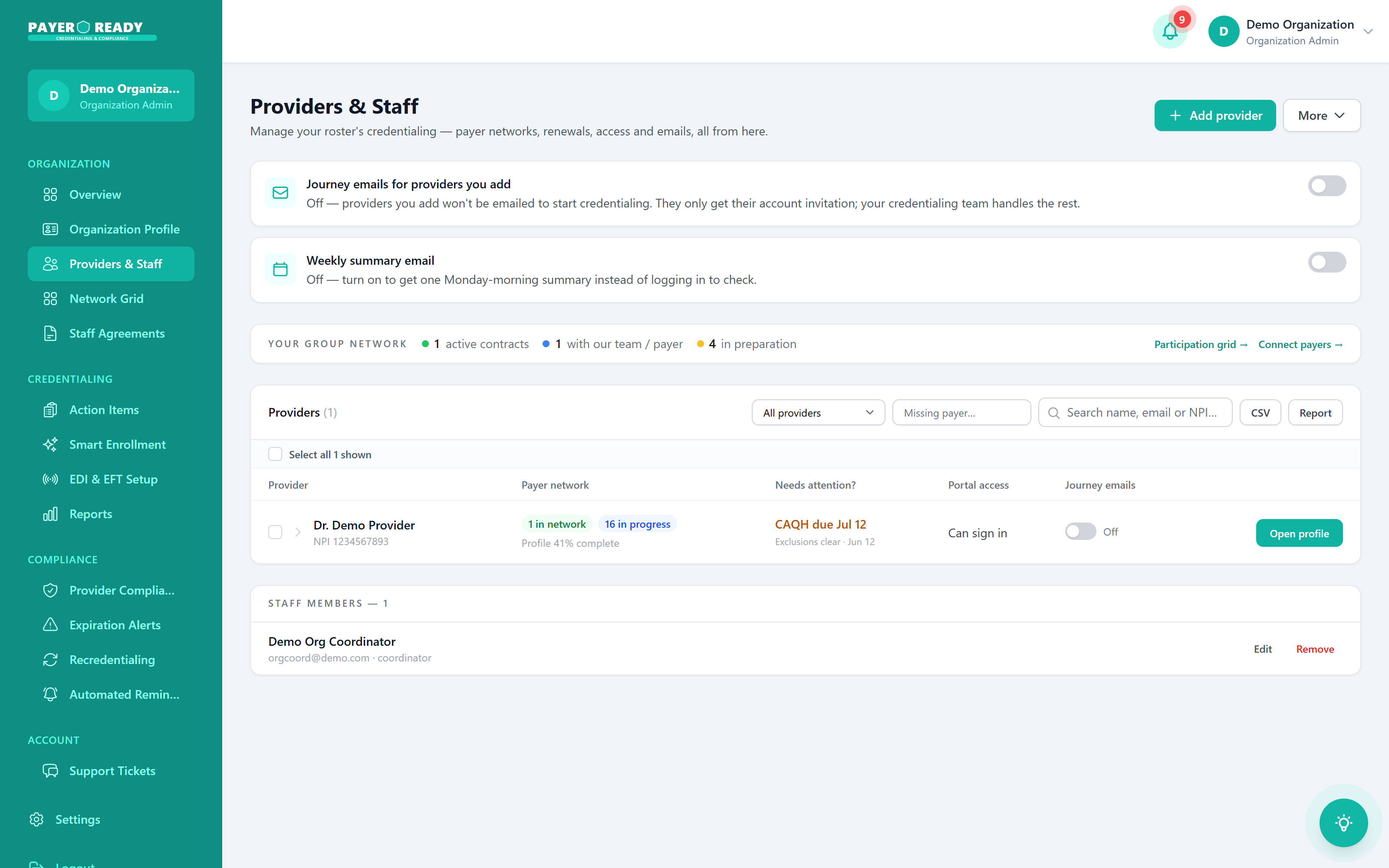
Whole roster, one screen
Readiness scored per provider
Watch a roster come ready
Licenses verified, CAQH attested, enrollments approved, documents complete. Cell by cell, provider by provider, and your readiness number climbs with it.
The admin week, before and after
Everything below is a real screen from the platform. This is the actual workflow your team inherits on day one.
Onboarding stops being a project
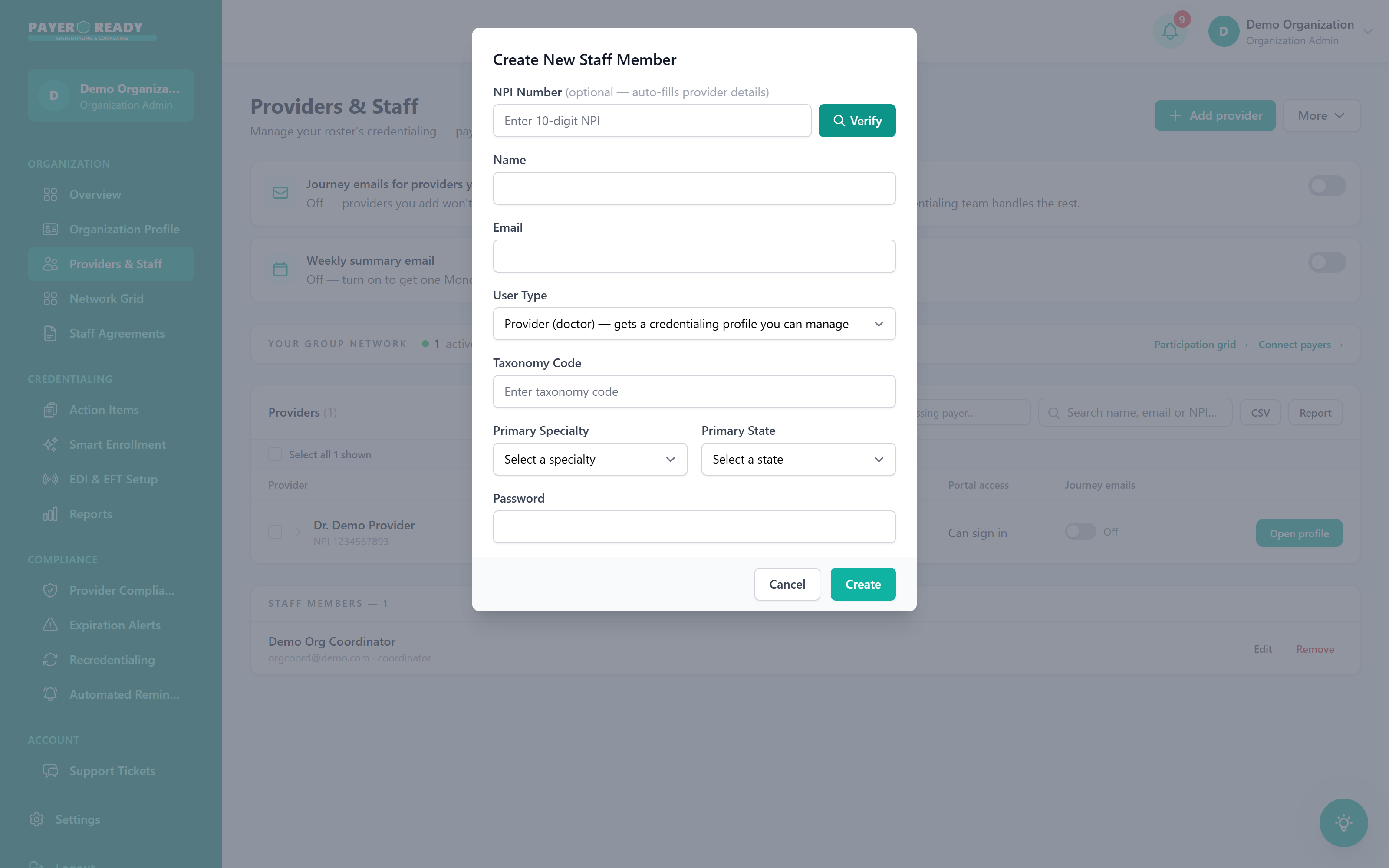
A new hire used to mean a folder of forms and three weeks of chasing. Now your admin enters the NPI and NPPES fills the profile, or you send an invite and the provider builds their own file: licenses, DEA, board certifications, documents. Their record links to your organization automatically and every payer application pulls from it.
- Add by NPI with NPPES prefill, or one click invites
- Providers own their data entry, admins own approval
- Per provider portal access you can grant and revoke
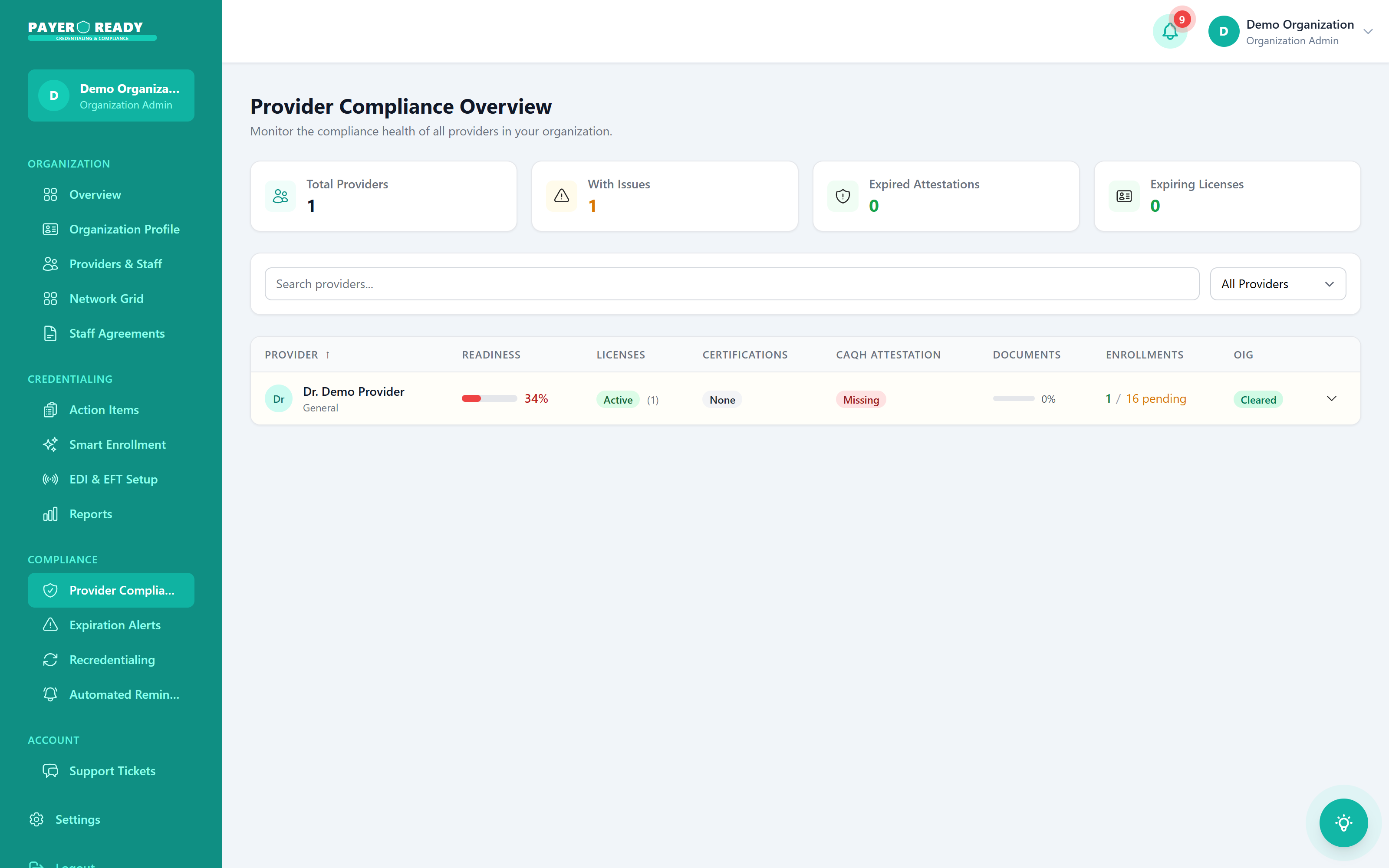
Compliance stops being a fire drill
Every provider is scored for readiness across licenses, certifications, CAQH attestation, documents, enrollments, and OIG status. Expirations alert at 90, 60, and 30 days. When a surveyor or auditor asks for proof, you filter and export instead of digging through cabinets.
- Readiness score per provider, roster wide view
- OIG and SAM exclusion screening on a schedule
- PDF and CSV audit exports filtered by provider or date
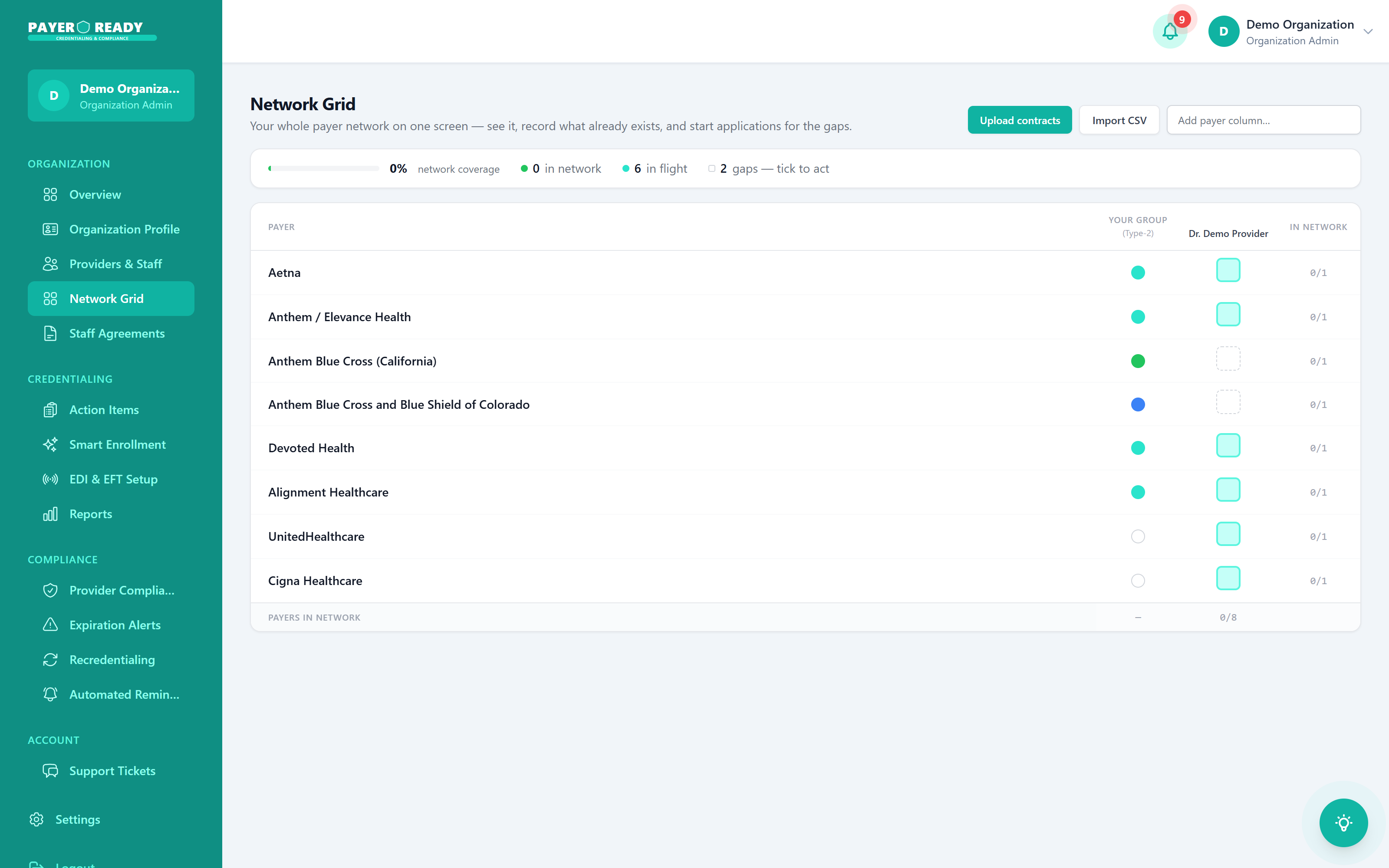
Network gaps stop hiding until a denial finds them
The Network Grid crosses every payer with every provider: in network, in flight, or gap. You see exactly which combination is missing before a claim tests it, and you start the application for the gap with a click. Your specialist takes it from there and logs every payer follow up on the file.
- Payer by provider participation matrix, live
- Gaps ticked to act, applications started in place
- Two week payer follow up cadence, logged
What disorganized credentialing actually costs an organization
These are not hypotheticals. They are the standing line items of running a roster on spreadsheets and memory.
Revenue held hostage by time to bill
Every week a provider waits on enrollment is a week of encounters that cannot be billed to that payer. At typical group volumes, a single stalled application carries five figures of deferred or forfeited revenue. The industry norm without disciplined follow up runs 120 to 180 days. Worked files close in 60 to 90.
Administrative labor that scales with headcount
CAQH re-attestation every 120 days. License renewals on staggered state cycles. Payer revalidations arriving by postal mail. Handled manually, each provider adds hours of recurring administrative load per month, and the burden compounds with every hire. Centralized on one platform, the same work becomes supervision.
Compliance exposure that surfaces at the worst time
A lapsed license or an excluded provider discovered during an audit is not an administrative footnote. Claims billed during a gap period are subject to recoupment, and billing for an OIG excluded provider carries False Claims Act exposure. Continuous monitoring exists so this category of surprise does not.
The organization admin toolkit, in full
Every capability below ships with the platform. No modules to license separately, no per seat surprises.
Roster and staff management
Add providers by NPI with NPPES prefill or one click invites. Control user types, portal access, and permissions for every clinician and coordinator.
License status integrity
The license dashboard shows every professional license across the roster: active, expired, or pending renewal, with the source record attached.
Application transparency
Every credentialing and enrollment application tracked from requested through pending payer to completed, with each payer response logged on the file.
Delegated tasks with accountability
Assign document requests and renewals to providers as tracked tasks. Each one carries an owner and a status, so nothing depends on somebody remembering an email.
Entity data foundation
Tax ID, organizational NPI, and entity certificates held once in the Organization Profile and reused by every group application and payer contract.
Financial documentation
Every invoice and payment tied to credentialing services in one Payments view, exportable for your accounting team, with unit pricing known in advance.
The modules doing this work
Each capability on this page is a real product module you can inspect in depth.
For administrators
Numbers an administrator actually feels
Not vanity metrics. These are the operating facts your week runs on once the roster lives in one system.
0
roster view for every provider and status
Licenses, CAQH, enrollments, documents, and open tasks on one screen instead of six spreadsheets that disagree.
0/60/30
day alerts before anything lapses
Three separate warnings before a credential can quietly take a provider off the schedule.
$0
per application at 51+ provider volume
Banded pricing: $149 through 20 providers, $139 through 50, $119 beyond. Known before anything starts.
0
payer relationships across all 50 states
Commercial, Medicare, Medicaid, TRICARE, and the regional plans your market actually runs on.
Organization questions, answered straight
What admins and practice managers ask before switching.
One dashboard shows every provider linked to your organization: enrollment status, license dates, CAQH attestation, documents, and open tasks per row. No switching between screens, no reconciling spreadsheets that disagree with each other.
No. Your organization controls everything. PayerReady gives you the tools and the workflow, but your admins decide what gets submitted and when, and you control user types and access for every doctor and coordinator on the roster.
Much less than now. Providers enter their own data through invites, NPPES prefills profiles from the NPI, expirations track automatically, and your PayerReady specialist handles payer follow ups. Your admin team supervises a dashboard instead of doing data entry.
Two ways. Send a one click invite and the provider builds their own profile and uploads documents, linked to your organization automatically. Or your admin adds them by NPI and NPPES fills in their details on the spot. Either way there is no manual re-keying.
Yes. Filter by provider, date, or status and export to PDF or CSV. Reports cover licensing status, credentialing progress, and enrollment history, which is exactly what internal auditors and accreditation surveyors ask for.
The Payments tab shows every invoice and payment tied to your credentialing services: what is paid, what is outstanding, and downloadable records for your accounting team. Per Payer pricing bands by roster size mean the unit cost is known before any application starts.